BatchPatch uses a combination of Windows Management Instrumentation (WMI) and PsExec to access remote computers, plus ICMP for pinging. If you need to use BatchPatch in an environment where your remote computers have Windows Firewall enabled, here’s what you need to do to make everything work.
It is sufficient to use Group Policy to allow “Remote Administration” and “File and Printer Sharing” on the remote computers.
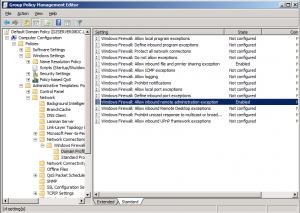
However, if Group Policy is not an option and you instead need to manually adjust the remote computer settings, here’s how:
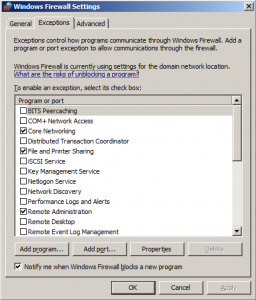
When the remote system is Windows 2008:
Go to Control Panel > Windows Firewall > Change Settings >Exceptions > check the box for “File and Printer Sharing” and “Remote Administration” and then click “Apply” or “OK.”
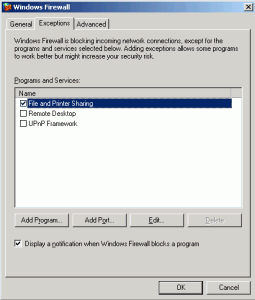
When the remote system is Windows 2003:
1. Go to Control Panel > Windows Firewall >Exceptions > check the box for “File and Printer Sharing” and then click “OK.”
2. Open a command prompt and type:
netsh firewall set service type = remoteadmin mode = enable